Anyone who has sat down to manually transcribe an hour-long interview, lecture, or meeting recording knows exactly how painful the process can be. You pause, you rewind, you type, you correct — and hours later you have a rough draft that still needs cleaning up. For creators, journalists, students, and knowledge workers who deal with audio or video content every day, this bottleneck is a real cost: in time, in focus, and in opportunity.
Video to Text is a web-based transcription tool built to eliminate that bottleneck entirely.
What It Does
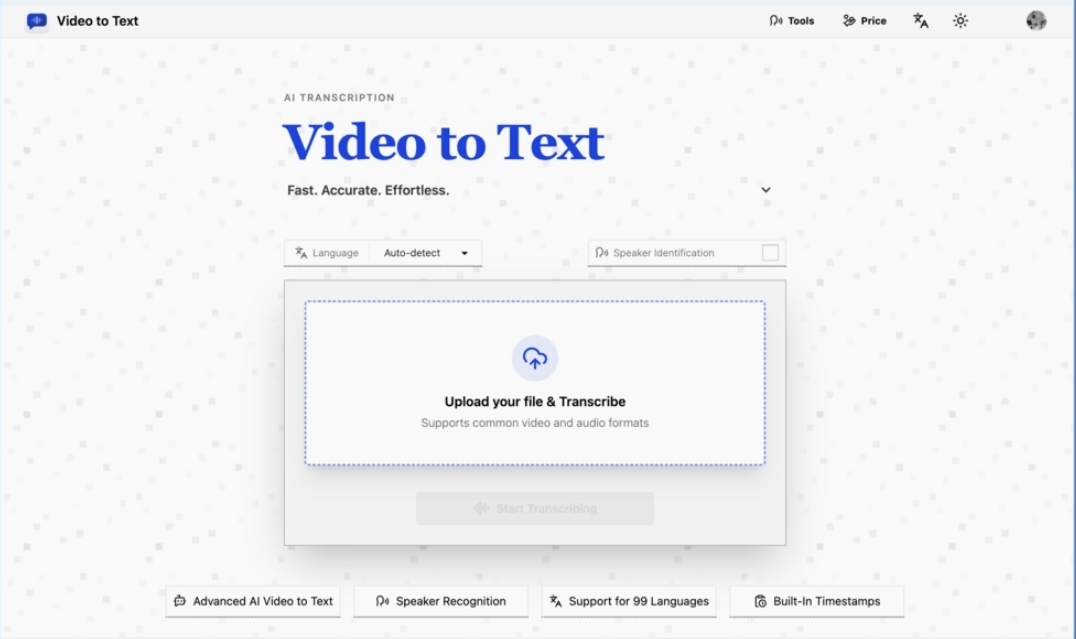
Video to Text accepts audio and video file uploads and converts them to clean, structured text using AI-powered speech recognition. The workflow is intentionally minimal: upload a file, wait for processing, and download the result. There is no software to install, no API keys to configure, and no manual steps between the spoken word and the exported transcript.
Supported input formats include common video files — MP4, MOV, M4V, WebM, MKV — and audio files including MP3, WAV, FLAC, AAC, M4A, OGG, and Opus. Files up to 5 GB and up to 10 hours in duration are accepted.
Output can be exported in four formats: SRT, VTT, TXT, and CSV. This covers the full range of practical use cases, from subtitle files for video editors to plain text for note-takers to spreadsheet-friendly records for data-driven workflows.
Speed That Changes the Equation
The transcription engine behind Video to Text operates at a Real-Time Factor (RTF) of 0.008x — meaning it processes audio roughly 125 times faster than it plays back. In practical terms:
- A 1-hour 3-minute meeting transcribes in about 35 seconds
- A 3-hour 15-minute podcast finishes in roughly 133 seconds
- An 8-hour 21-minute video course completes in around 300 seconds
That speed fundamentally changes how transcription fits into a workflow. Instead of waiting overnight or managing a queue, users can upload a recording and have a usable transcript before they’ve finished their next cup of coffee.
Language Coverage Without Compromise
One of the more significant limitations of older transcription tools is language support that quietly degrades outside of English. Video to Text supports 99 languages, including English (with regional variants for Global, American, British, and Australian), Spanish, French, German, Italian, Portuguese, Dutch, Chinese, Japanese, Korean, Arabic, Hindi, Russian, and many more — covering widely spoken languages across every major region of the world.
Automatic language detection is built in, removing the need to manually specify what language a file is in. For content that mixes languages — international interviews, multilingual conference recordings, or code-switched conversations — the system handles multiple languages within a single file without requiring manual segmentation.
Speaker Diarization for Multi-Person Audio
Transcribing a single speaker is one problem. Transcribing a conversation between multiple people is another. Video to Text includes speaker diarization, which identifies and labels individual speakers throughout the recording. Rather than returning a wall of undifferentiated text, the system produces a transcript where each segment is attributed to a distinct speaker — an essential feature for meeting notes, interview transcripts, and any content with more than one voice.
Timestamped output adds another layer of usability. With timestamps attached to each segment, the transcript becomes a navigable document: editors can jump to specific moments, journalists can cite exact positions in a recording, and subtitle files align precisely with the source media.
Who It’s Built For
The tool is designed around a set of real, recurring needs:
Content creators use it to generate subtitle files for YouTube videos, social media clips, and online courses. Rather than manually writing captions, they upload the finished video and export an SRT file directly into their editing software.
Journalists and researchers use it to convert interview recordings into searchable, quotable text. A one-hour conversation becomes a document they can read, annotate, and search in minutes rather than hours.
Students and educators use it to capture the content of lectures, seminars, and video lessons. A recorded class session becomes a set of study notes. A video course becomes a readable reference.
Professionals in knowledge-intensive roles use it to turn meeting recordings into structured action items. Instead of half-remembered notes, teams get a complete record of what was said and by whom.
Pricing That Scales With Actual Use
Video to Text uses a pay-as-you-go model with no monthly subscription. New users receive 30 free minutes on sign-up — enough to evaluate the product on real content before committing any payment.
Paid tiers are priced by minutes of processed audio:
| Plan | Price | Minutes |
| Lite | $9.9 | 200 min |
| Pro | $19.9 | 600 min |
| Ultra | $99 | 6,000 min |
There are no recurring charges. Users purchase minutes when they need them and the balance carries forward indefinitely. A 14-day refund policy applies to unused credits for anyone who decides the product is not the right fit.
A Simple Bet
The premise of Video to Text is simple: most people who work with audio and video content need transcripts, but most transcription tools make the process harder than it needs to be. By combining a fast AI transcription model with a minimal upload-and-export interface and broad language support, Video to Text aims to make the spoken word as accessible as the written one.
For anyone who has ever stared at a recording and dreaded the hours of manual work ahead, it is worth trying.
From Spoken Word to Structured Text: How Video to Text Makes Transcription Effortless
Anyone who has sat down to manually transcribe an hour-long interview, lecture, or meeting recording knows exactly how painful the process can be. You pause, you rewind, you type, you correct — and hours later you have a rough draft that still needs cleaning up. For creators, journalists, students, and knowledge workers who deal with audio or video content every day, this bottleneck is a real cost: in time, in focus, and in opportunity.
Video to Text is a web-based transcription tool built to eliminate that bottleneck entirely.
What It Does
Video to Text accepts audio and video file uploads and converts them to clean, structured text using AI-powered speech recognition. The workflow is intentionally minimal: upload a file, wait for processing, and download the result. There is no software to install, no API keys to configure, and no manual steps between the spoken word and the exported transcript.
Supported input formats include common video files — MP4, MOV, M4V, WebM, MKV — and audio files including MP3, WAV, FLAC, AAC, M4A, OGG, and Opus. Files up to 5 GB and up to 10 hours in duration are accepted.
Output can be exported in four formats: SRT, VTT, TXT, and CSV. This covers the full range of practical use cases, from subtitle files for video editors to plain text for note-takers to spreadsheet-friendly records for data-driven workflows.
Speed That Changes the Equation
The transcription engine behind Video to Text operates at a Real-Time Factor (RTF) of 0.008x — meaning it processes audio roughly 125 times faster than it plays back. In practical terms:
- A 1-hour 3-minute meeting transcribes in about 35 seconds
- A 3-hour 15-minute podcast finishes in roughly 133 seconds
- An 8-hour 21-minute video course completes in around 300 seconds
That speed fundamentally changes how transcription fits into a workflow. Instead of waiting overnight or managing a queue, users can upload a recording and have a usable transcript before they’ve finished their next cup of coffee.
Language Coverage Without Compromise
One of the more significant limitations of older transcription tools is language support that quietly degrades outside of English. Video to Text supports 99 languages, including English (with regional variants for Global, American, British, and Australian), Spanish, French, German, Italian, Portuguese, Dutch, Chinese, Japanese, Korean, Arabic, Hindi, Russian, and many more — covering widely spoken languages across every major region of the world.
Automatic language detection is built in, removing the need to manually specify what language a file is in. For content that mixes languages — international interviews, multilingual conference recordings, or code-switched conversations — the system handles multiple languages within a single file without requiring manual segmentation.
Speaker Diarization for Multi-Person Audio
Transcribing a single speaker is one problem. Transcribing a conversation between multiple people is another. Video to Text includes speaker diarization, which identifies and labels individual speakers throughout the recording. Rather than returning a wall of undifferentiated text, the system produces a transcript where each segment is attributed to a distinct speaker — an essential feature for meeting notes, interview transcripts, and any content with more than one voice.
Timestamped output adds another layer of usability. With timestamps attached to each segment, the transcript becomes a navigable document: editors can jump to specific moments, journalists can cite exact positions in a recording, and subtitle files align precisely with the source media.
Who It’s Built For
The tool is designed around a set of real, recurring needs:
Content creators use it to generate subtitle files for YouTube videos, social media clips, and online courses. Rather than manually writing captions, they upload the finished video and export an SRT file directly into their editing software.
Journalists and researchers use it to convert interview recordings into searchable, quotable text. A one-hour conversation becomes a document they can read, annotate, and search in minutes rather than hours.
Students and educators use it to capture the content of lectures, seminars, and video lessons. A recorded class session becomes a set of study notes. A video course becomes a readable reference.
Professionals in knowledge-intensive roles use it to turn meeting recordings into structured action items. Instead of half-remembered notes, teams get a complete record of what was said and by whom.
Pricing That Scales With Actual Use
Video to Text uses a pay-as-you-go model with no monthly subscription. New users receive 30 free minutes on sign-up — enough to evaluate the product on real content before committing any payment.
Paid tiers are priced by minutes of processed audio:
| Plan | Price | Minutes |
| Lite | $9.9 | 200 min |
| Pro | $19.9 | 600 min |
| Ultra | $99 | 6,000 min |
There are no recurring charges. Users purchase minutes when they need them and the balance carries forward indefinitely. A 14-day refund policy applies to unused credits for anyone who decides the product is not the right fit.
A Simple Bet
The premise of Video to Text is simple: most people who work with audio and video content need transcripts, but most transcription tools make the process harder than it needs to be. By combining a fast AI transcription model with a minimal upload-and-export interface and broad language support, Video to Text aims to make the spoken word as accessible as the written one.
For anyone who has ever stared at a recording and dreaded the hours of manual work ahead, it is worth trying.