It’s 6:47 AM on a Tuesday. You’re already fielding work emails before your coffee is ready, while simultaneously trying to remember whether your daughter has soccer practice tonight, whether the plumber is coming this week, and who was supposed to pick up groceries. Sound familiar? For millions of working professionals, the mental load of managing a household while maintaining a demanding career has reached a breaking point.
The challenge isn’t just busyness — it’s the fragmented, scattered nature of modern family life. Sticky notes on the fridge, group texts that get buried, and half-remembered verbal agreements simply don’t hold up against the complexity of today’s schedules. Something more intelligent is needed.
Enter the touch screen calendar — a centralized, interactive hub that brings your entire household into focus. More than just a digital planner, it connects family members, syncs with your favorite scheduling apps, and gives everyone a clear picture of what needs to happen and when. In this article, we’ll explore why this technology is transforming household management, break down its most powerful features, and walk you through exactly how to implement one in your home for a calmer, more coordinated family life.
The Modern Challenge of Household Management for Working Professionals
The average working professional makes hundreds of micro-decisions every day — and a surprising number of them have nothing to do with their job. Who’s driving the kids to practice? Did anyone call the electrician back? Is there enough food in the house for dinner tonight? These questions don’t pause when you step into a meeting or board a flight. They accumulate quietly, creating a persistent background hum of domestic anxiety that follows you everywhere.
For dual-income households especially, the logistics of running a home have grown genuinely complex. Family members operate on different schedules, tasks fall through the cracks between handoffs, and the tools most people rely on — phone reminders, shared notes apps, the occasional sticky note — weren’t designed for the level of coordination modern family life demands. The result is a household management system held together by memory and good intentions, both of which are in short supply by Wednesday afternoon.
What working professionals need isn’t just a better calendar — it’s a centralized system that handles scheduling, task delegation, and real-time updates without requiring everyone to be in the same room. The ability to manage household responsibilities remotely, check in on what’s been completed, and coordinate with family members through a single platform isn’t a luxury. For busy households, it’s become a genuine necessity. A reliable scheduling app connected to a shared household hub addresses exactly this gap, turning scattered domestic chaos into something manageable and visible for everyone involved.
What is a Touch Screen Calendar and Why It Matters
A touch screen calendar is an interactive digital display — typically wall-mounted in a central home location like the kitchen or hallway — that combines the visual clarity of a traditional planner with the connectivity of modern smart devices. Unlike a paper calendar or a basic phone app, it operates as a shared, always-visible command center that every household member can see and interact with at a glance. Think of it as the difference between a bulletin board and a live dashboard: one is static, the other responds.
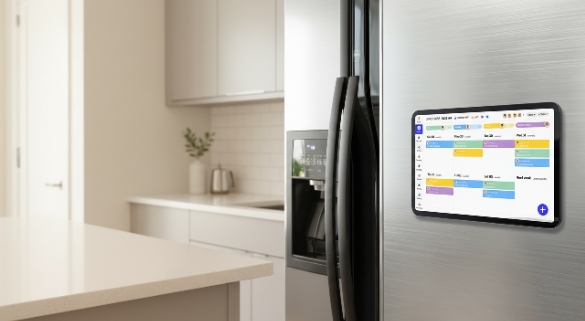
The evolution from paper planners to digital calendars happened gradually, but the jump to touch screen technology represents something more significant than just another format change. Early digital calendars lived on individual devices — your phone, your laptop — which meant the information stayed siloed with one person. A touch screen calendar breaks that barrier entirely. It puts shared information in a shared space, making household schedules visible and accessible to everyone without requiring anyone to open an app or check a notification.
Where standard scheduling apps excel at personal organization, they fall short in household contexts because they weren’t built for group coordination. Platforms purpose-built for shared household use, such as Everblog, bridge this gap by functioning as both a display and an input device, allowing family members to add events, check off completed tasks, and view the week ahead without sitting down at a computer. The visual interface — color-coded by person or category, displayed in large, readable format — eliminates the ambiguity that plagues text-based group chats and shared note documents.
For modern families managing overlapping work schedules, school commitments, and household responsibilities, this visibility is transformative. When everyone in the household can see the same information in real time, fewer things get missed, fewer conversations need to happen just to establish basic coordination, and the mental load gets distributed rather than carried by one person alone.
Key Features for Effective Household Management
Scheduling App Integration and Syncing
The real power of a touch screen calendar lies in its ability to stay current without manual effort. When synced with mobile scheduling apps like Google Calendar, Apple Calendar, or Microsoft Outlook, the display updates automatically the moment any family member makes a change from their phone. A dentist appointment added during a lunch break appears on the home screen before anyone walks through the front door. This cloud-based synchronization means you’re never managing two separate systems — your personal work calendar and your household calendar become one coherent picture, accessible from anywhere.
Task Management and Prioritization Tools
Beyond scheduling events, a touch screen calendar functions as a living to-do list. You can create categorized task lists — home maintenance, errands, school-related items — and assign priority levels so the most time-sensitive responsibilities stay visible rather than buried. Automated reminders push notifications to connected devices before deadlines hit, which means the system does the remembering so you don’t have to. For professionals who context-switch constantly between work and home responsibilities, having tasks organized by category and urgency on a single screen dramatically reduces the cognitive effort of figuring out what needs attention next.
Family Chores Organizer and Collaboration
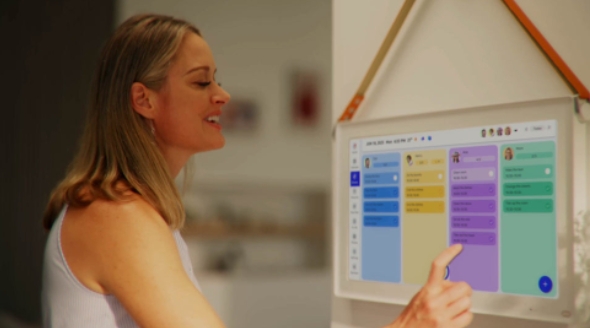
One of the most practical features for households with children or multiple adults is the built-in family chores organizer. Tasks can be assigned to specific people, color-coded by individual, and marked complete directly on the screen. When your teenager checks off “take out recycling,” everyone sees it updated in real time — no follow-up texts required. The visual interface makes accountability natural rather than confrontational: responsibilities are clearly posted, progress is transparent, and nothing falls through the cracks because someone assumed someone else handled it. This shared visibility is what transforms a household calendar from a scheduling tool into a genuine coordination system.
Step-by-Step Guide to Implementing Your Touch Screen Calendar System
Choosing the Right Hardware and Software
Start by evaluating your household’s actual usage patterns before purchasing anything. A screen mounted in a high-traffic area like the kitchen needs to be large enough to read from across the room — typically 10 inches or larger — with a bright, glare-resistant display that remains legible in varying light conditions. For software, prioritize platforms that support multiple user accounts and integrate natively with the scheduling apps your family already uses. A system that requires everyone to switch apps creates friction from day one. Look for touch screen calendars that run on open operating systems, which give you flexibility to install third-party apps rather than locking you into a single ecosystem.
Setting Up for Remote Household Management
Once your hardware is mounted and powered, the first configuration priority is cloud connectivity. Link the device to a shared household account — Google Family or Apple Family Sharing both work well — and connect each family member’s individual calendar to that central account. This ensures that when you update a meeting from your office laptop, it appears on the home screen automatically. Enable two-way sync rather than one-way display so family members can add events directly on the touch screen and have those changes reflect immediately on everyone’s phones. Turn on push notifications for time-sensitive tasks, and set the display to show the next 48 hours prominently so nothing urgent gets overlooked during busy mornings.
Integrating Task Management and Family Schedules
With connectivity established, build your household structure directly into the system. Create a color code for each family member and apply it consistently across both events and tasks — this visual shorthand makes the screen scannable in seconds. Set up recurring events for fixed weekly responsibilities like trash day, school pickups, and recurring meetings, so they populate automatically without manual entry each week. Use the family chores organizer to assign weekly tasks at the start of each Sunday, giving everyone a clear picture of their responsibilities before the week begins. For task management, create separate lists for urgent household items, upcoming errands, and longer-horizon projects, reviewing and reprioritizing each Friday to keep the system current and genuinely useful.
Maximizing Efficiency: Advanced Tips for Busy Professionals
Once your system is running smoothly, a few targeted habits will keep it working at full capacity. Set a single weekly review — Sunday evening works well for most households — to audit completed tasks, add upcoming commitments, and clear outdated items before the week starts. Use automation wherever possible: schedule recurring reminders for bill due dates, school deadlines, and seasonal home maintenance tasks so they surface automatically rather than relying on memory. If your touch screen calendar supports voice input, use it during busy mornings to add events hands-free. Finally, resist the urge to over-complicate the display. A clean, uncluttered screen that shows only what’s relevant this week is far more useful than an exhaustive archive nobody reads. The goal is a system your whole household actually engages with — simple, visible, and always current.
From Household Chaos to Coordinated Family Living
Managing a household while maintaining a demanding career doesn’t have to mean carrying the entire mental load alone. A touch screen calendar addresses the core problem that trips up most busy families: critical information living in too many places, accessible to too few people. By centralizing schedules, tasks, and chore assignments into a single shared display, it transforms household coordination from a daily guessing game into a system everyone can actually rely on.
The benefits compound quickly once the system is in place. Scheduling app integration keeps your home and work calendars aligned without duplicate effort. Task management tools ensure nothing urgent slips through the cracks during a busy week. The family chores organizer distributes responsibility visibly, reducing the friction that comes from unclear expectations. And because the whole system is accessible remotely, you stay connected to what’s happening at home even when you’re deep into a workday.
The families that thrive under pressure aren’t necessarily the ones with the lightest schedules — they’re the ones with the clearest systems. A touch screen calendar gives your household that clarity. If you’ve been managing the chaos with a combination of sticky notes, group texts, and memory alone, now is the right time to upgrade. Set it up once, build the habits around it, and watch how much calmer your household becomes when everyone is finally working from the same page.